
Businesses are increasingly turning their eyes toward artificial intelligence. The reasons are simple: customers expect more, your rivals are always on the move , and companies keep striving for better efficiency — much like Sisyphus pushing his stone uphill, endlessly. The business goals remain the same: sell, deliver, support. The difference lies in how we get there now.
Just a few years ago, an online store looked like this: a customer asks about delivery, an operator manually looks up the answer, the queue grows, and everyone gets frustrated. Today, an AI chatbot can handle 70–80% of those requests on its own. Humans focus on what truly needs their attention. The business gains are obvious — 24/7 availability, lower costs, and happier customers.
At some point, someone on the business side inevitably says: “Let’s just build an AI feature. How hard can it be?” Well, here’s what it usually looks like in reality:
- No machine learning experience;
- The team are Java developers, not data science gurus;
- The system has been running in production for years — and nobody wants to break it;
- You can’t just “plug in” new tech — proper integration is needed.
The good news? You don’t have to build your own model from scratch. There’s a wide range of ready-to-use tools — from LLM APIs to open-source solutions. And yes — you can actually do it, no PhD needed. The Java ecosystem makes it possible to integrate AI into enterprise projects without tearing everything apart. The best approach is to move AI functionality into a separate layer or service. That way:
- The core business logic stays untouched (if it works — don’t change it);
- The AI component remains isolated and easy to reason about;
- You can add and improve features gradually, without the risk of breaking the whole system.
AI in your system? Perfectly doable.
Problem statement
An online store wanted to integrate AI into its application. The business expectations were quite straightforward: managers should be able to type natural phrases like “Show me discounted products in the electronics category” — and instantly get a relevant product selection.
Of course, a few constraints appeared right away:
- No SQL spells for managers;
- Minimal implementation cost — no epic architecture redesigns, and definitely no need to bring in an entire ML team.
Existing logic
The system was built in Java (Spring Boot + PostgreSQL) and already had a REST endpoint that handled database for searching needed info/products.
The problem? That endpoint was far too narrow in scope:
- Search worked only within a single category;
- Parameters accepted only exact values;
- No greater than/less than operators, partial matches, or complex conditions.
In other words, it worked precisely — but with zero flexibility.
At the same time, the endpoint returned a structured response that the frontend already consumed. And here came a crucial requirement: even if the data would later be fetched through AI, the response format had to remain exactly the same.
That ensured frontend stability and backward compatibility.
Database schema:
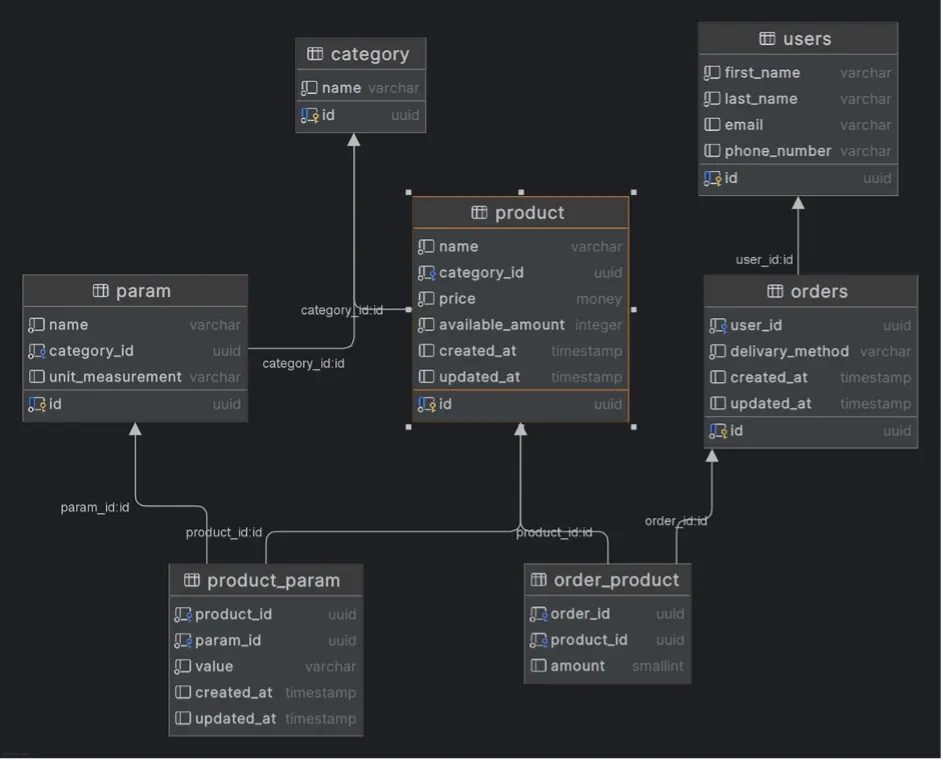
Endpoint: POST /products
Request body:
{
“category”: “8cacd6cf-37db-4b75–9219–88808ff59e0e”,
“params”: [
{
“id”: “c2a19482-d216–4e6a-abd2-e2443c4f8cfc”,
“values”: [
“12”,
“24”,
“36”
]
},
{
“id”: “585489b8-f64a-439e-9e5f-2c51fabe8355”,
“values”: [
“сірий”
]
}
]
}
Response body:
[
{
“id”: “ddddddd1-dddd-dddd-dddd-dddddddddddd”,
“name”: “Smartphone”,
“categoryId”: “11111111–1111–1111–1111–111111111111”,
“price”: 699.99,
“availableAmount”: 100,
“createdAt”: “2025–06–22T16:58:51.042661Z”,
“updatedAt”: “2025–06–22T16:58:51.042661Z”
}
]
Solution
During a brainstorming session, two main ideas emerged for implementing the AI functionality:
1. Generate an SQL query using AI
The idea: pass the user’s text request to an AI model and get back a ready-to-execute SQL query for the database.
Pros: maximum flexibility — you can build any query with conditions, filters, ranges, and more.
2. Generate a DTO object from text
Another option was to teach the AI to directly produce a ready-to-use DTO based on the user’s text description.
Pros: the existing business logic stays unchanged, while users are free to make requests in natural language.
Overall architecture
For the implementation, we chose a cloud-based LLM model from OpenAI. It already handles natural language very well and can return structured responses — making it an optimal choice for our scenario.
Here’s how the overall architecture looks like:
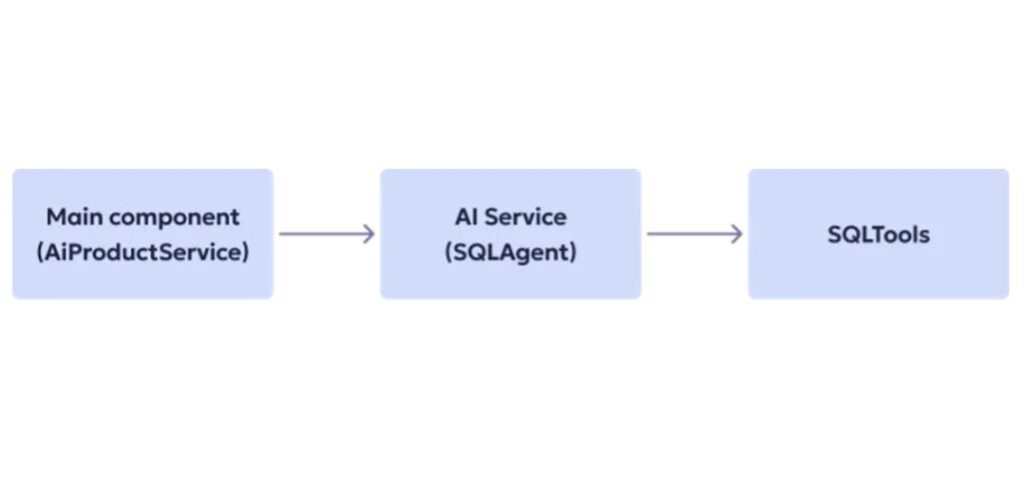
The first step in both approaches was to create an AI agent with a system prompt — the part that defines the model’s context and behavioral rules. We described exactly what task the agent should perform, what data it should analyze, and what kind of response it should return.
This prompt was created iteratively. After each iteration of testing, we noted which instructions the model interpreted ambiguously or where errors occurred, and gradually refined and extended the prompt. With every iteration, the agent “understood” our system and user queries better.
The next shared step was adding tools — let’s look at how that worked for both options below.
Generating SQL queries with AI
We decided not to describe the database structure manually in the prompt. Instead, we gave the agent the ability to query the database directly and retrieve the information it needed about the schema.
To make that possible, we implemented a set of specialized tools that send service queries to PostgreSQL:
- A tool to get a list of all tables in the schema;
- A tool to get a list of fields for a specific table.
This approach provided several benefits:
- Always up-to-date information about the database structure — no more “stale prompts” after schema changes;
- The agent isn’t overloaded with unnecessary context — it fetches extra data only when truly needed;
- The system message contains only the non-obvious structural details that the model can’t infer on its own.
Examples of prompts and code are available here: https://github.com/polinaucc/ai-sql-generation
Testing challenges
One of the first questions we faced was simple: Should the agent query the database every single time just to fetch the schema? The answer came quickly — no. The schema rarely changes, while the load keeps growing. So we added caching for service queries, which immediately reduced the pressure on the database.
Then we discovered another issue: the model sometimes tried to “save steps” by generating SQL directly — skipping the helper tools. The result? Imaginary fields and syntax errors. The fix was straightforward: define strict rules for when the agent should use each tool and what responses they should return.
Another challenge involved the response format. The generated SQL might have been syntactically correct but didn’t match our DTO structure. To avoid that, we built a separate mechanism that reminds the model of the required field set for each entity.
On the agent level, we had to abandon the automatic mode — it kept calling every available tool in context. We switched to EXPLICIT mode, where we manually define which tools are available, which model is used, and whether memory is enabled. This restored control and eliminated chaos.
And even then, surprises happened. Occasionally, the AI generated SQL that PostgreSQL rejected at the parsing stage. To avoid manual corrections, we introduced two mechanisms:
- Memory to preserve context between steps;
- Retry logic, giving the model a second chance to fix and re-run the query based on the specific error.
Examples:
User input: Please show me all products with weight between 50 and 70 kg
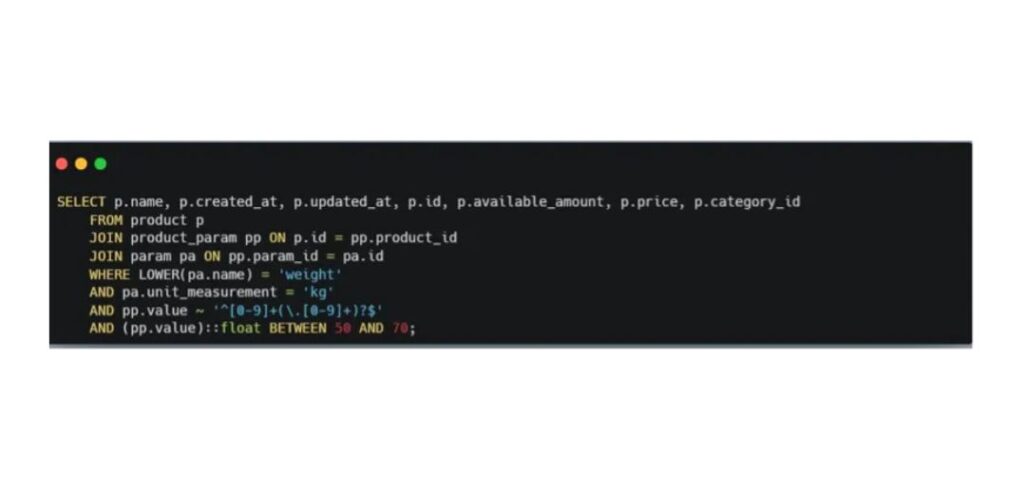
We started with the simplest possible tasks. For example, we asked the model to show all products weighing between 50 and 70 kilograms — and overall, the generated query worked.
The AI correctly handled the trickiest part of our database: how we store product attributes. In our case, this is a varchar column that can contain either numeric ranges like 20–50 or plain text values such as “gray.”
Of course, the query wasn’t perfect — it included a few unnecessary parameters that could be optimized out. But as a starting point, the result was quite solid.
User input: I want to receive list of Electronics products with weight between 0.1 and 0.4 tons
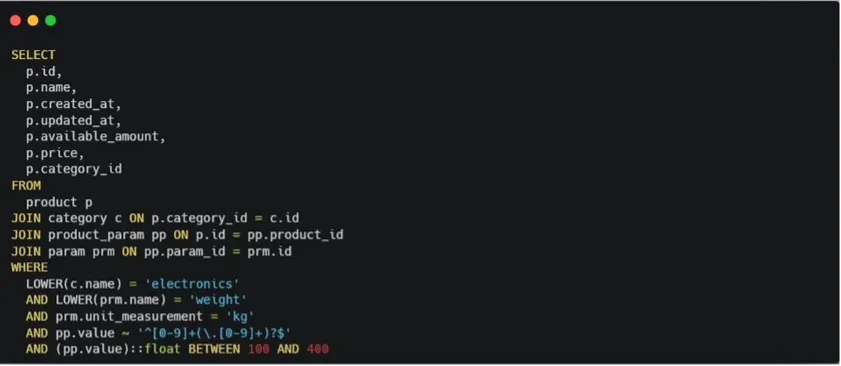
The challenge here was that the weight in our database is stored in kilograms.
It was crucial to correctly convert the user’s input units into our internal ones.
And it worked. We achieved this by adding another tool — one that queries the database to retrieve the unit of measurement for a given attribute name.
The only note: the tools must always return a value.
A null response is considered invalid.
User input: I want to receive list of Electronics products with voltage suitable for US and power 60W
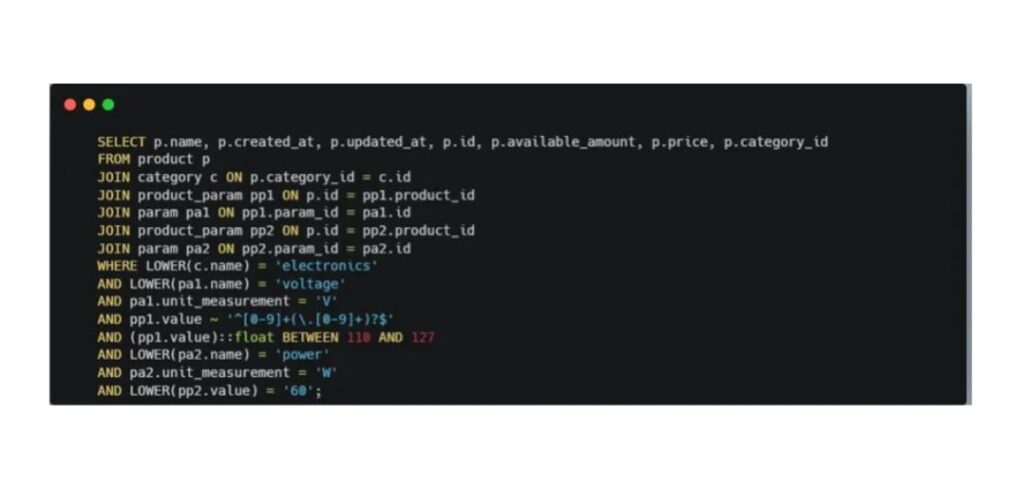
This time, we made the query a bit more complex: we asked the model to generate a list of products with voltage that meets U.S. standards.
Our database didn’t actually contain information about voltage by country — but the AI managed to find the correct values on its own and included them in the final query.
Tasks like this are exactly where AI proves most useful.
User input: Please show me all books where author is a woman

As a result, the AI generated a query with a search by the parameter author_gender, which didn’t exist in the database.
Insights: SQL query generation
- The quality of prompts and tool descriptions is absolutely critical. The clearer they’re written, the lower the chance that the model will “forget” to call the right tool.
- Log your tool calls. The simplest way is to enable debug logs in LangChain — that way you can see exactly when and with which parameters each tool was triggered. It makes analysis much easier.
- Tool outputs can be stored in memory to avoid redundant calls. But there’s a flip side: if memory is too limited and multiple tools are required, the agent may start looping — calling tools repeatedly without ever reaching a final result.
- Also, keep in mind that identical prompts don’t always produce identical results. The temperature parameter controls the model’s “creativity.” Lower values make outputs more predictable — useful for code or SQL generation. Higher values add flexibility, but make it harder to reproduce the same result, for example, after a retry.
- And finally, always validate generated SQL queries. The safest way is to run them on a read replica or a dedicated test database with a limited data pool. Another option is to implement sanitization before execution.
Insights: DTO generation
For this approach, we built several supporting tools:
- Two simple ones — to retrieve the corresponding ID by a category or parameter name (since our endpoint works with IDs, while users never specify them in text);
- Another one — to generate the structure of the object expected in the response.
We annotated the sample queries and generated objects with comments to make testing easier.
Here’s what we noticed during the process:
- This approach turned out to be more predictable, as it relied on our existing business logic.
- There were fewer user-facing errors. In some cases, the DTO was generated incorrectly — but the user simply received no result. That could be seen as both a downside and a feature.
- We knew that only SELECT operations were executed, so no additional sanitization was required.
- Evaluating model responses was much simpler in this setup.
The trade-off? Less flexibility.
You can only get what’s already defined by the existing business logic.
COMPARISON OF BOTH OPTIONS THAT CAN BE USED
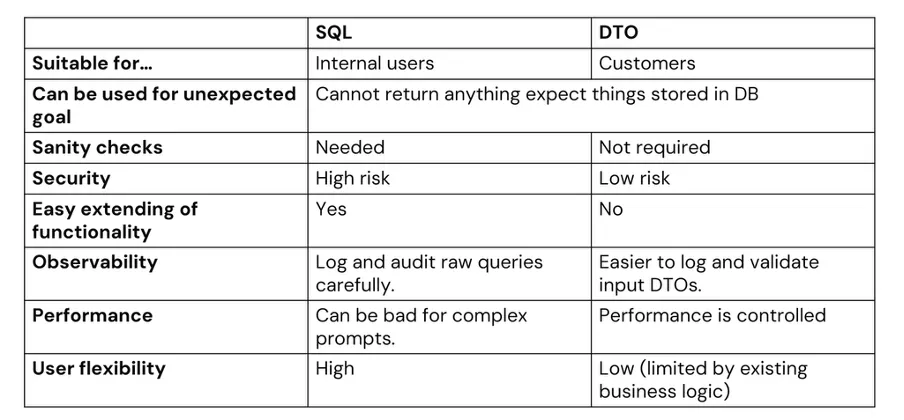
In our view, for production solutions with real users, it’s safer and more stable to rely on DTO generation. It also allows better performance control — since the executed queries are the ones we’ve already verified.
SQL generation, on the other hand, makes sense for internal use cases, where maximum flexibility matters and the risks are acceptable.
What to keep in mind
AI is a powerful modern tool that can be integrated into existing systems relatively quickly, significantly expanding the capabilities of already written logic. At the same time, it’s important to remember that the results aren’t always fully predictable. You need to account for security concerns and the cost of integration, which can grow depending on usage intensity.